Klaviyo vs Mailchimp for a Shopify store: what actually decides it
The platform is rarely why a programme isn't working. It's sometimes why it can't get any better.


Both send email to a list. The difference that matters is what each one knows about the person receiving it, and what you're allowed to do with that. If your flows are three deep and your list has never been cleaned, this isn't your problem yet.
Most brands ask this a year too early
The tool is the easiest thing to blame. But if you've got three flows, a list nobody has cleaned and one send a month, the platform isn't what's holding you back. Moving it costs you a fortnight and changes nothing you can measure afterwards.
The comparison earns its keep at one moment. When the thing you want to send can't be built where you are. Until then, both of them send email, and neither one is the reason revenue is flat.
What each platform knows about the person
The real difference isn't a feature list. It's what gets stored. Klaviyo keeps a profile with its events attached: viewed a product, started a checkout, placed an order, at what value and when.
| Klaviyo | Mailchimp | |
|---|---|---|
| Built around | A profile and its event history | A contact in an audience, with tags |
| Segments on | Behaviour over time, including what didn't happen | Contact fields, tags and connected store data |
| Automation | Flow filters, trigger filters and conditional splits | Journeys with branching, and fewer parts to configure |
| Reporting | Revenue per flow and per campaign, on a window you set | Revenue per campaign and per automation |
| Suits | A store where the next email depends on the last click | A brand sending good mail to a list it already understands |
Mailchimp is built around contacts in audiences, with tags and whatever its store connection brings in. That covers a great deal of work. It starts to strain when what you want to say depends on a sequence of events instead of a fact about the person.
Where the automation runs out
The ceiling nearly always feels the same. Somebody wants one flow to behave differently for a first time buyer and a returning one, on the same trigger, without maintaining two copies of it.
- A split on how many orders the profile has, part way through the flow
- A filter that removes somebody the moment they buy, not at the next step
- A wait until a decent hour, so nothing arrives at three in the morning
- A condition on a product property, not the product itself
- An exclusion that reads what another flow sent them yesterday
Most of that can be approximated anywhere with enough audiences and enough patience. The question isn't whether it's possible. It's how many moving parts you want to maintain, and who maintains them when the person who built it leaves.
So test it instead of reading about it. Build the awkward flow in a trial account on the platform you're considering, with your own product data in it, and time yourself. A demo built by a salesperson isn't evidence about your catalogue.
What you can prove at the end of the month
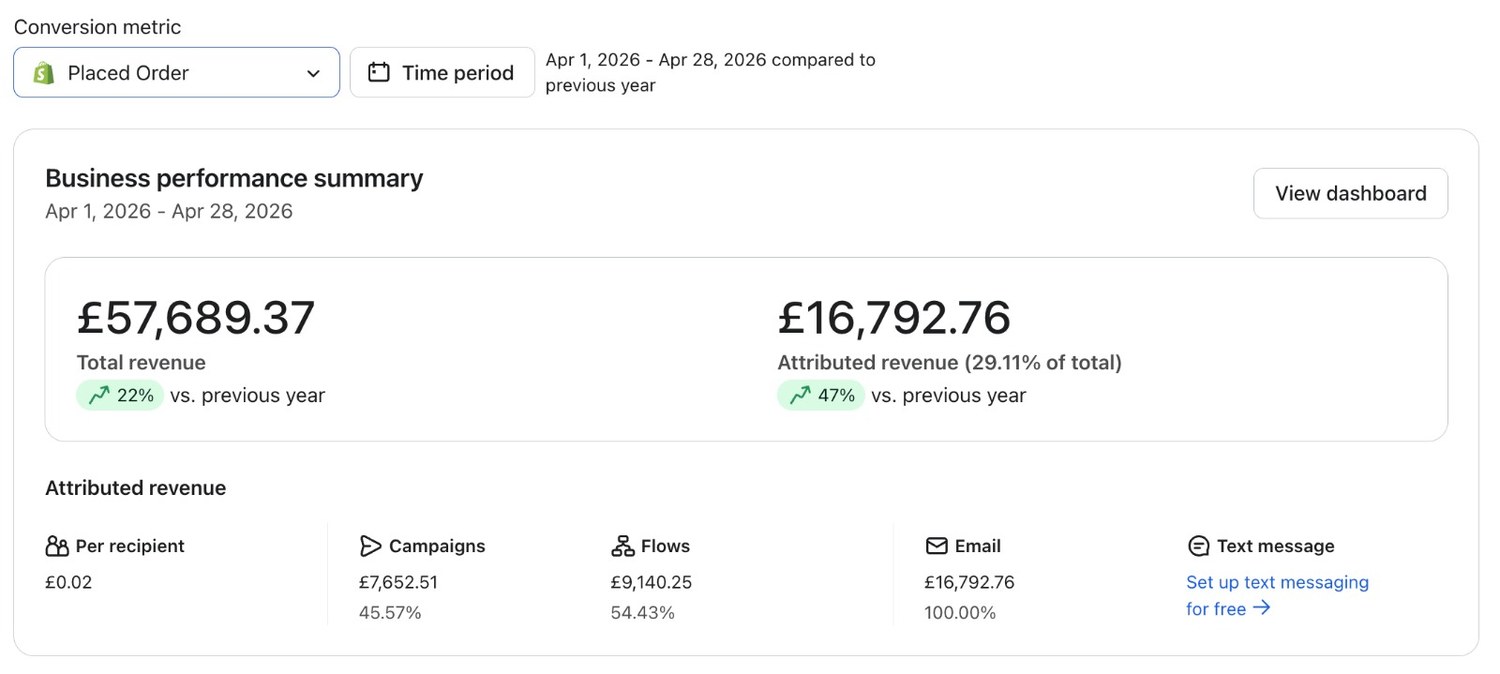
This is where the argument actually gets settled. Whatever you send, somebody upstairs wants to know what email did against what the store did, over the same window, on one screen.
One view with the window, the store total and the attributed share on it is worth more than any feature comparison. It's the thing you'll be asked for every month. If your platform can't produce it without a spreadsheet, that's a real reason to move.
What you're actually paying for
Both bill on the size of the list, and people miss what that means. A list nobody's cleaned gets charged for twice: once on the invoice, and again in the delivery it quietly costs you.
So run your sunset rules before you price a migration. Brands that suppress their dormant profiles first often find the gap between the two platforms is smaller than the gap between their own list before and after.

The honest test, and our bias
We're an official Klaviyo partner. Read everything above with that attached, because it's a real bias, and hiding it would be the exact thing our buyer's guide tells people to watch for.
The test we'd apply on your account is one question. Name the email you want to send and can't send today. If it's specific and it matters, moving is worth the disruption. If the honest answer is that the flows are old and nobody has read them since setup, that problem follows you across.
- Write down the flows you actually want, and what each one has to know
- Check whether your current platform can do that, not whether it's fashionable
- Clean the list either way, because otherwise you carry the problem with you
- Move once, with a full export, and keep the old account readable for a quarter
If the answer's move, what we do inside Klaviyo is the shape of that job, and how we build email systems is the whole programme around it. If the answer's stay, we'll say so in your growth consultation and tell you what to fix instead. No hard feelings.
Theo Tziapouras
Founder and strategy at Engage Commerce, the ecommerce agency for 7 and 8 figure DTC brands.
FAQs

Is Klaviyo better than Mailchimp for Shopify?
For a store whose next email depends on what the customer just did, yes, because the whole platform is built around that event history. For a brand sending good mail to a list that needs no behavioural logic, Mailchimp isn't the reason revenue is flat. Name the email you can't send today before you decide.
How long does a move between email platforms take?
Plan for weeks, not a weekend. Exporting and importing the list is the quick part. Rebuilding the flows, checking the store integration, authenticating the sending domain and warming the volume through the new platform is the work, and rushing that last one is how brands land in spam.
Will I lose my subscribers or their history if I move?
Subscribers come across, as long as the consent record travels with them. What rarely travels cleanly is the historic event data behind old campaigns, so export your reports and keep the old account readable for a quarter. Don't delete anything on the day you switch.
Can I run both platforms at the same time?
Briefly, while you move, and never as a settled arrangement. Two platforms mailing one list means two sender reputations, two suppression records and two versions of who unsubscribed, and the one everybody forgets is the one that does the damage.
Do I need to change platform to fix my email revenue?
Usually not. Most accounts we open have a deliverability fault, a list nobody has cleaned and flows switched on once and never read again. Fixing those where you already are is faster than a migration, and it tells you whether the platform was ever the problem.
A platform is a ceiling, not an engine
Changing platform fixes the things a platform decides. What you can store, what you can split on, what you can prove at the end of the month. It fixes nothing about a list nobody cleans, flows nobody reads or a calendar nobody writes. Sort those first, on whatever you're already paying for, and the migration question tends to answer itself.
Platforms compared
What you give up either way, and what a migration actually changes.

Klaviyo vs Shopify Email: what you give up either way
Shopify Email is fine until the day you need flow logic. That day turns up earlier than most brands expect.
Read it
Klaviyo vs Omnisend for ecommerce email: what you are choosing between
One is a customer database that sends email. The other is an email tool that got good at ecommerce. Choose on that.
Read it
Email vs SMS marketing ecommerce: which channel to add next
Only one of these three charges you by the message. That one fact decides almost everything about how you use it.
Read itWould you rather this was just handled?
Bring your Klaviyo account and the thing annoying you most. We will tell you what we would fix first, before you spend anything.

Half an hour with Theo, our founder.
We're all about relationships built on trust, mutual respect and a shared vision for success. If that sounds like your vibe, let's make some waves together 🌊