A Mailchimp to Klaviyo migration: what breaks, and what to check first
The data moves in an afternoon. Consent, reputation and every automation you had running are the parts that take a month.


Most of a migration is dull and quick. The parts that hurt are the ones nobody exports: who agreed to hear from you, what your domain has earned, and the automations that were quietly doing the work. Move those in the wrong order and the first send lands nowhere.
What comes across, and what quietly doesn't
The export itself takes an afternoon. Contacts, tags and unsubscribes come out of Mailchimp as a file and go into Klaviyo without much drama. Everything that isn't in that file is the actual project.
| Thing | Does it move | What that means for you |
|---|---|---|
| Contacts and tags | Yes, as a file | Tags arrive as profile properties, so every segment you had gets rewritten, not reused |
| Unsubscribes and bounces | Only if you export them | The one item on this list with a legal edge to it |
| Open and click history | No | Engagement segments start empty, so sunset and winback rules have nothing to read for a while |
| Sending reputation | No | A new sending setup is a new sender, whatever the list looks like |
| Templates | Not usefully | Mailchimp markup fights the Klaviyo editor. Rebuild them and stop paying for the argument |
| Automations | No | The two platforms don't describe a trigger the same way, so a rebuild is the honest option |
So here's the honest framing. A migration isn't a data job. It's a permissions and reputation job, and the file is the easy half of it.
The export nobody checks is the one that matters
Take the suppression list before you take the subscribers. Unsubscribes, complaints and hard bounces have to be sitting in Klaviyo before the first send goes out, and it's the item most likely to get skipped on a Friday afternoon.
- Everyone who unsubscribed in Mailchimp, imported as suppressed, instead of simply left behind
- Complaints and hard bounces, for exactly the same reason
- Where each address came from, so a consent question has an answer in a year
- Anything Mailchimp itself imported from an older platform that nobody can now account for
- The unengaged, who are a decision to make, not a box to tick
That last line is the opportunity. A migration is the cheapest chance you'll ever get to leave dead weight behind, because nobody has to be talked into deleting anything. They just don't get invited across.
Sending reputation doesn't travel with the list
Reputation belongs to a domain and to the infrastructure sending for it. Never to the addresses. Change platform and, as far as Gmail's concerned, you're a new sender who's turned up with a suspiciously large audience.
So publish SPF, DKIM and DMARC on the new sending domain, and confirm they pass on a real send, not on a preview. Then start with the people most likely to open, and widen from there over days.
And if deliverability is already poor in Mailchimp, moving won't fix it. It'll hide it for a fortnight. Clean the list first, move second. What we do inside Klaviyo starts in the same place, for the same reason.
The pop-up that stops working the day you switch
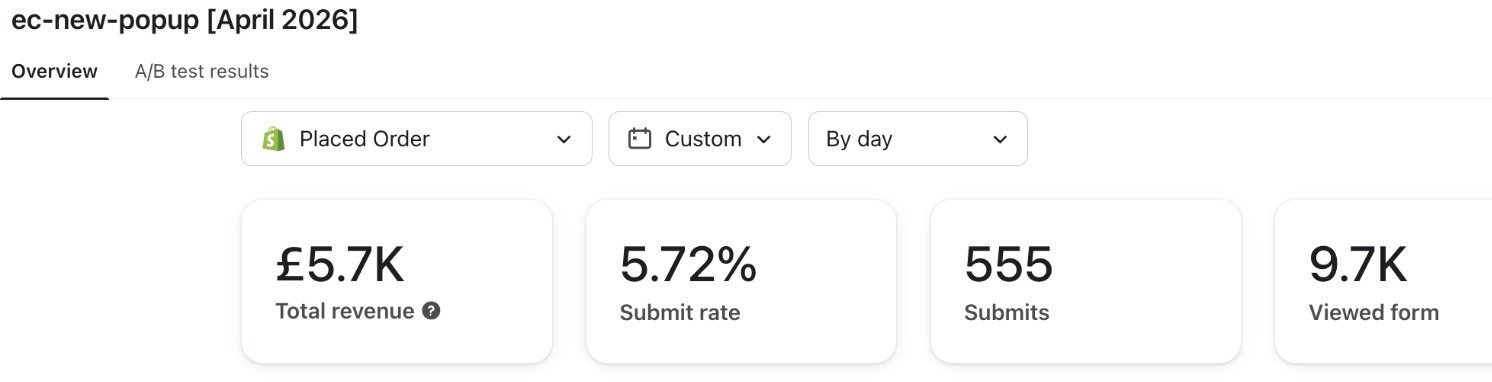
Forms are the part that breaks silently. The Mailchimp pop-up dies the moment its script comes off the theme, and if the Klaviyo form isn't live and tracking the same day, you spend a week acquiring nobody.
Rebuild the form, point it at the list the welcome series reads, then watch the submit rate for a week instead of assuming parity. And check the two quiet sources while you're in there: the marketing box at checkout, and account creation.
Rebuilding the flows is the good news here
Nothing automated ports. A Mailchimp customer journey and a Klaviyo flow don't mean the same thing, so a copy would only be a translation of somebody's old compromises.
Rebuild in the order the money sits: welcome series, abandoned checkout, then browse and post purchase. The flow library is what that stack looks like finished, and the first two usually cover the cost of the move on their own.
The gain is real, and it's why most brands move in the first place. Trigger filters, flow filters and conditional splits let you describe a customer situation Mailchimp could only approximate with tags.
The order to work in, and the week it goes wrong
- Export contacts, tags and the suppression list, and agree out loud who isn't coming with you
- Build the Klaviyo account and connect Shopify first, so orders and profiles are there before the people are
- Publish authentication on the sending domain and check it passes on a real send
- Import suppressions, then subscribers, then switch the sign up forms over on a single day
- Rebuild welcome and checkout, turn them on, and leave the campaign calendar alone for a fortnight
- Warm up on engaged segments, widen slowly, then close the Mailchimp account instead of leaving it quietly running

The week it goes wrong is always the one where both platforms are live and nobody owns the calendar. Pick a date, tell everyone, and send from one place from that morning.
Theo Tziapouras
Founder and strategy at Engage Commerce, the ecommerce agency for 7 and 8 figure DTC brands.
FAQs

Will I lose subscribers when I move to Klaviyo?
Not to the export itself. Contacts move as a file and arrive intact. You lose people to the decisions around it. A list nobody has cleaned in years should shed the addresses that never engage, and a badly warmed domain loses reach for a few weeks while the new sender earns its reputation back.
Does my open and click history come across?
No. Engagement history stays in Mailchimp, so on day one every engagement segment in Klaviyo is empty and starts filling from your first send. Export the reporting you care about before you close the old account, and expect sunset and winback rules to be unusable for a month or so while the new history builds.
How long does a Mailchimp to Klaviyo migration take?
The data is an afternoon. A sensible migration runs across two to four weeks, because authentication has to be published and verified, the domain has to be warmed on engaged segments first, and the flows get rebuilt, not copied. Rushing the warm up is the shortcut that costs the most.
Can I run Mailchimp and Klaviyo at the same time?
For a short overlap, yes, and it's sensible while you check the data landed. Sending from both isn't. Two platforms with two views of who unsubscribed will eventually email somebody who asked you to stop, and that's the mistake with a regulator attached to it.
Do I need a new sending domain?
If you already send from a subdomain you own and its record is clean, you can authenticate the same domain in Klaviyo and keep what it's earned. If Mailchimp was sending on its own shared infrastructure, you're starting a new sender, and it needs warming properly.
A migration is a good week to be ruthless
The temptation is to recreate what you had, only tidier. Resist it. Everything you carry across now gets carried again at the next platform change, so leave behind the dead addresses, the template nobody liked and the automation that fires at three in the morning. The account you build in the first fortnight is the one you'll still be working in two years from now. Much easier to start it clean than to clean it later.
Platforms compared
What you give up either way, and what a migration actually changes.

Klaviyo vs Mailchimp for a Shopify store: what actually decides it
The platform is rarely why a programme isn't working. It's sometimes why it can't get any better.
Read it
Klaviyo vs Shopify Email: what you give up either way
Shopify Email is fine until the day you need flow logic. That day turns up earlier than most brands expect.
Read it
Klaviyo vs Omnisend for ecommerce email: what you are choosing between
One is a customer database that sends email. The other is an email tool that got good at ecommerce. Choose on that.
Read itWould you rather this was just handled?
Bring your Klaviyo account and the thing annoying you most. We will tell you what we would fix first, before you spend anything.

Half an hour with Theo, our founder.
We're all about relationships built on trust, mutual respect and a shared vision for success. If that sounds like your vibe, let's make some waves together 🌊