Klaviyo smart sending and quiet hours: the settings that mute your flows
What smart sending actually does to a message, how a muted flow looks in the reporting, and the four settings people blame instead.

A flow that was earning stops earning, nobody has touched it, and the first thing anybody blames is a setting. Sometimes that's right. More often the setting is doing its job and something else in the account changed underneath it, so it's worth knowing which is which.
Smart sending skips a message, it doesn't hold it back
This is the part the name hides. If somebody has already had a message from you inside the smart sending window, the next one isn't queued up for later. It's skipped, and that person never gets it at all.
For a campaign that's usually what you want, because the alternative is two emails in an afternoon. For a flow it gets expensive. Somebody browses a product an hour after your Tuesday campaign lands, enters the browse abandonment flow, and the message meant to catch them is dropped.
One account setting, and a toggle on every message
Smart sending is set once at account level, per channel, and then carried by a toggle on each individual message. It's on by default on most of them, which is why almost nobody remembers turning it on.
- The window is set in account settings, and it's measured in hours, not days
- Email and SMS carry their own separate windows, so changing one leaves the other alone
- Every campaign and every flow message has its own toggle, which overrides nothing but itself
- Anything a customer is waiting for, such as a back in stock alert, is a candidate for having it off
- Anything promotional is a candidate for leaving it on, whatever the flow is called
The trap is that second line. A brand sending email and SMS together often assumes one window governs both, then wonders why the same person got two nudges about the same basket inside an hour.
What a muted flow looks like in the reporting
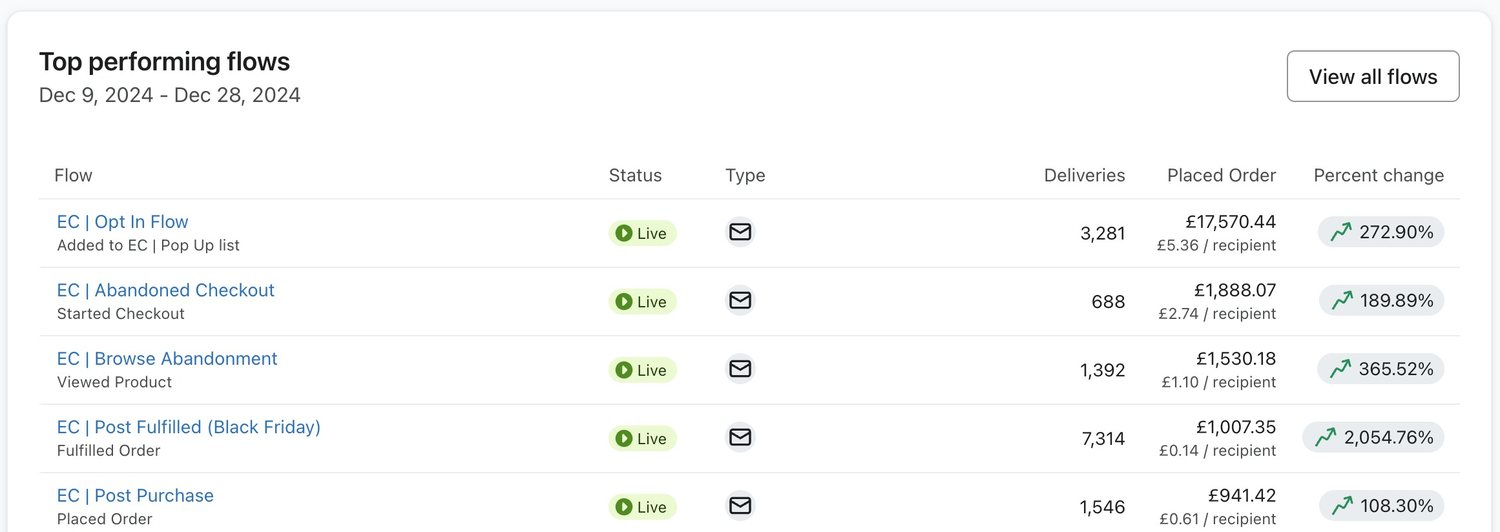
The tell is a gap between how many people entered a flow and how many were actually delivered a message. Klaviyo reports skipped sends and gives a reason for them, so the answer is in the account and not in a theory.
So read the deliveries column against what you know about your traffic. A browse abandonment flow delivering to a fraction of the people who viewed a product is either filtered, muted or triggered on the wrong event, and the skipped reasons will tell you which of the three inside a minute.
The time windows people forget they set
Quiet hours are the other half of this. SMS carries them for legal reasons as much as courteous ones, and flow time delays can be restricted to particular days and particular hours, which is a setting somebody usually turns on during a launch and never turns off.
None of that is wrong. It goes wrong when the restriction and the delay fight each other, and a message meant to arrive an hour after the basket was abandoned arrives on Monday morning instead. By which time the customer has bought it somewhere else.
- Check whether each time delay is allowed to send on weekends, because carts don't respect office hours
- Check what your account does with an SMS caught by quiet hours, since holding and skipping are very different outcomes
- Check the time zone the account is working in before you argue about when anything landed
- Check any delay somebody added for a sale and left in place afterwards
Four settings that look like smart sending and aren't
Smart sending gets blamed for all of these, because it's the one with a memorable name. Each one produces the same complaint, that a flow has gone quiet, and each one needs a different fix.
| What is happening | Where to look | What it looks like |
|---|---|---|
| The flow is set to manual | The status beside the flow name | Messages queue up and wait for somebody to approve them |
| A flow filter never passes | The filter on the message, not the trigger | People enter the flow and leave it without being sent anything |
| A delay is restricted | The time delay step | Sends bunch up at the start of the next allowed window |
| The profile is suppressed | The profile itself | Skipped for a reason that has nothing to do with this flow |
| Smart sending | The toggle on the message | Skipped because something else reached them inside the window |
Work down that table in order before you touch anything. Change the smart sending window because a flow looked quiet, when the flow was actually in manual, and you've now changed the behaviour of every message in the account for no reason.
Leave it on, and fix the thing sitting on top of it
Our default is smart sending on for anything promotional, off for anything the customer asked for, and the window left where it came. It exists to stop you being the brand that sends three emails before lunch, and readers remember that one.

When a flow is being skipped often, the honest reading is that your campaign calendar is landing on top of it. The fix is on the calendar side: send to tighter segments, leave room around the days when flows do their work, and stop sending to everybody because the list is there.
That's a strategy problem in a settings problem's clothes, and it's the commonest one we find in an inherited account. See the the flow library for what should be running underneath the calendar, and what we do inside Klaviyo for how the two get sequenced so they stop competing.
Theo Tziapouras
Founder and strategy at Engage Commerce, the ecommerce agency for 7 and 8 figure DTC brands.
FAQs

Should smart sending be on or off in Klaviyo?
On for anything promotional, off for anything the customer is waiting for, such as a back in stock alert or a shipping update. The default is sensible for most accounts, and turning it off across the board makes your flow numbers look better while making your emails more annoying.
Why is my Klaviyo flow showing skipped sends?
Because something told the platform not to send to that person: smart sending, a filter on the message, suppression, or the flow sitting in manual. Klaviyo records a reason next to the skip, and reading it takes seconds. Do that before you change any setting, because the four causes need four different fixes.
Does smart sending delay the email or cancel it?
It cancels it for that person. Nothing is queued for later and nothing arrives once the window closes, which is how an aggressive campaign calendar quietly hollows out a flow that used to earn well. The person simply never receives that message.
Do quiet hours apply to email as well as SMS?
Quiet hours as a formal setting belong to SMS, where they exist for legal reasons as well as manners. Email gets the same effect from time restrictions on flow delays and from send scheduling, which are easy to set during a launch and easy to forget about afterwards.
The setting is rarely the story
Smart sending, quiet hours and time restrictions are all doing what somebody told them to do, usually months ago and usually for a good reason at the time. The useful habit is to read the skipped reasons before you form a theory. The account already knows the answer, and it'll hand it over in less time than it takes to argue about it.
Klaviyo mechanics
The settings that quietly decide what your flows do, from someone who has rebuilt a flow stack.

Klaviyo flow filters vs trigger filters: which one decides who gets the email
One is checked once, at the door. The other is checked again before every email, and that is where the money leaks.
Read it
Klaviyo segments vs lists: which to use, and what breaks when you pick wrong
A list is a room people get put in. A segment is a question the database answers again every time you ask it.
Read it
Klaviyo Smart Send Time is guessing: here's how to find your list's real send window
The model behind Smart Send Time learned its habits from opens Apple fired for you. Clicks and revenue know when your list really reads.
Read itWould you rather this was just handled?
Bring your Klaviyo account and the thing annoying you most. We will tell you what we would fix first, before you spend anything.

Half an hour with Theo, our founder.
We're all about relationships built on trust, mutual respect and a shared vision for success. If that sounds like your vibe, let's make some waves together 🌊